
FilePolish
All file tools

Compress a huge PDF.

A scanned report can be too large to work with comfortably. Make a smaller copy on your computer, see the measured result and check the pages before you share it.

Desktop Founding workflow. Mac beta: up to 1 GiB and 500 pages. Website and Free desktop PDFs remain limited to 200 MiB.

Mac beta: Apple Silicon, macOS 12+. Unsigned and not notarized by Apple.

From source file to saved copy.

  1. Open the original in the desktop app

    Connect your existing Founding access, then open the PDF from disk. The large-file workflow reads the document locally. Keep the original while you work.

  2. Choose a sensible compression goal

    Try structural repacking first, or permit supported image recompression for a stronger reduction. You can try an output ceiling. The app reports a miss if it cannot reach it.

  3. Save, reopen and check

    Review the actual output size, save a separate copy and reopen it. Inspect dense pages, small writing, page count and any text or forms you need before delivery.

A real-size engineering example

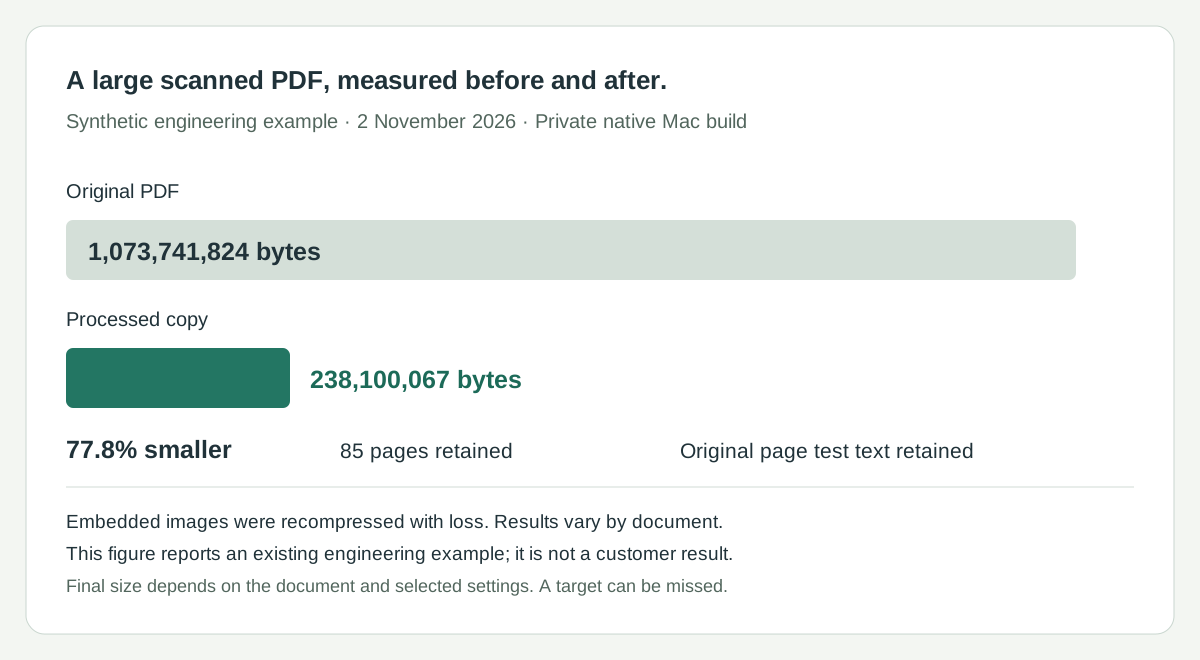
In a private Mac engineering run on 2 November 2026, a synthetic 1 GiB, 85-page PDF became a 238,100,067-byte PDF. Independent saved-file checks found the original test text on every page. Embedded images were recompressed with loss; this is one dated example, not a customer result or a guarantee for another document.

Original
1,073,741,824 bytes · 85 pages
Saved copy
238,100,067 bytes · 85 pages
Method
Two measured passes · embedded-image recompression
Review
Original test text retained on all 85 pages
Measured historical synthetic PDF example: 1,073,741,824 bytes became 238,100,067 bytes, with 85 pages before and after.
Recorded engineering result from 2 November 2026. The illustration presents actual measurements; it is not a screenshot or a new customer test.

For the report that is too large to pass around

Scanned records, catalogues, manuals and image-heavy reports can be awkward to transfer or store. The useful result is a smaller, readable working copy. FilePolish processes the document on your device rather than uploading its content to a compression service.

A large input allowance is not an output promise

The native limit is exactly 1,073,741,824 bytes and 500 pages. Some text-only or already-compressed PDFs have little size left to save. The historical example above is still about 238 MB: accepting a 1 GiB input does not mean it will become a 1 MB attachment.

Choose what may change

Structural repacking aims to preserve the document. Recompressing embedded images can discard visible detail. This large-file route does not redraw every page to force a target. Rewriting can invalidate digital signatures, so retain signed originals and review the saved copy.

Check the desktop fit before buying for this task

This workflow is available in the Apple Silicon Mac unsigned beta. Apple has not notarized the app. Review the installation and access instructions, and check that the beta fits your Mac before buying for this desktop task.

Before you start

Can I upload a 1 GiB PDF to this website?

No. The website and Free desktop intake ceiling is 200 MiB. Use the supported desktop Founding workflow for larger PDFs. The ordinary browser PDF compressor remains available for smaller documents.

Will every PDF reach my chosen size?

No. The result depends on its contents and acceptable image quality. A target miss is reported. Check the receiving system’s actual format, page and byte requirements.

Does the whole app work without the internet?

Working-file transformations stay on your device. Access checks, downloads, payments and updates use network services. Local processing is not a promise that the entire application never connects.

Make the next delivery easier.

Founding Edition is $19 once for the first 250 members. Review the desktop requirements and keep your originals while you work.